Test scripts let you write unit tests for your Util Scripts and run them directly in the Rive editor. Use them to verify math helpers, string utilities, or any other pure logic your scripts depend on. Beyond validating your code, tests also serve as precise instructions for the AI Agent, helping it produce code that behaves exactly as you intend.Documentation Index
Fetch the complete documentation index at: https://rive-accessibility.mintlify.app/llms.txt
Use this file to discover all available pages before exploring further.
Creating a Test Script
Create a new script and select Test as the type.Anatomy of a Test Script
A Test script exposes a singlesetup(test: Tester) function. The Tester object gives you helpers to define and group tests:
test.case(name, fn)– define a single test case.test.group(name, fn)– group related tests. Groups can be nested.expect(value)– create an expectation object to assert on a value.
expect function is passed as an argument to your test callback.
Example
Matchers (expectations)
Theexpect helper returns an object with matcher methods you can use in your tests, for example:
Inverting matchers with never
You can invert any matcher by chaining .never before it. This means: the test passes only if the matcher would normally fail.Running Tests
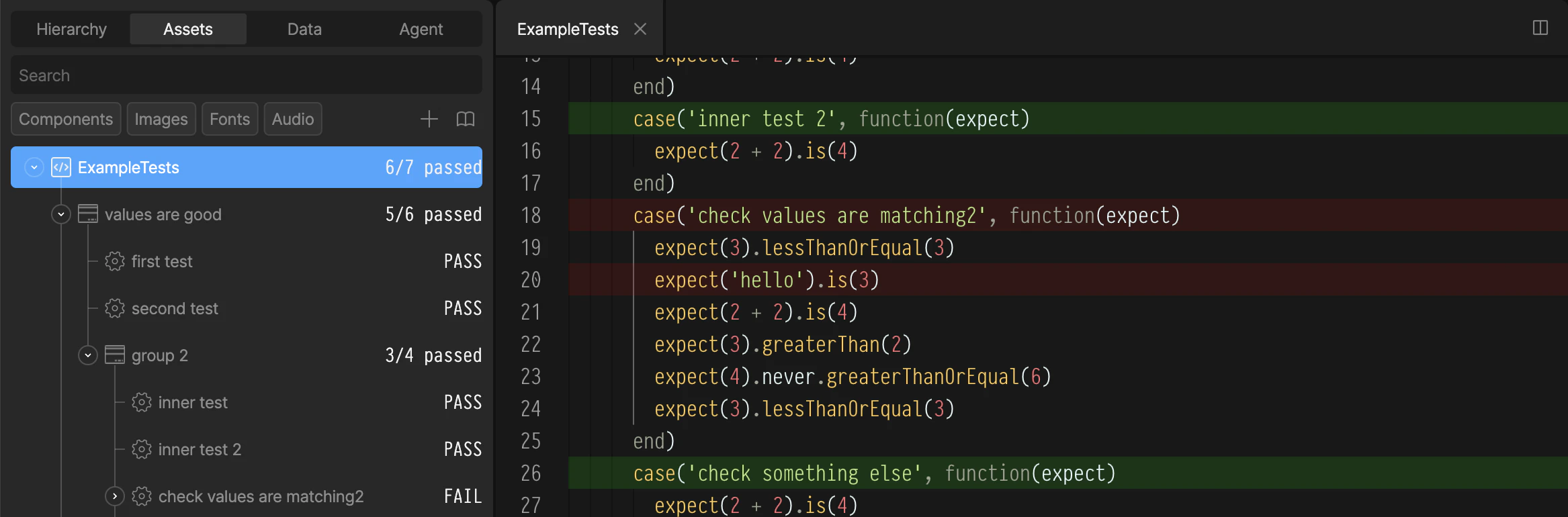
- In the Assets panel, right-click your Test script.
- Select Run Tests.
- Passing and failing cases are listed under the script in the Assets Panel
- Passing and failing cases are highlighted in the script editor